The Meta Quest 3S 128GB is your gateway to a world where reality bends and imagination takes over. Launched as an affordable yet powerful mixed reality (MR) headset by Meta, this all-in-one device blends virtual reality (VR) with real-world elements, delivering immersive entertainment, productivity, and social experiences without the need for a PC or wires.
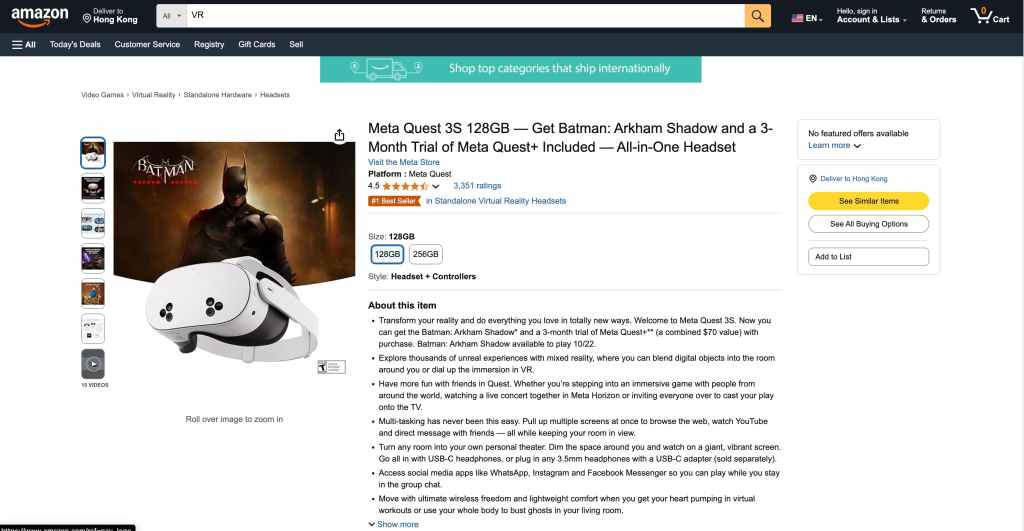
Priced competitively, it includes a free copy of Batman: Arkham Shadow—a thrilling VR-exclusive game—and a 3-month trial of Meta Quest+, unlocking a curated library of apps and games (a combined $70 value). Whether you’re a VR newbie or a seasoned explorer, the Quest 3S offers a standout balance of performance, comfort, and accessibility.
Powered by the Qualcomm Snapdragon XR2 Gen 2 chipset and 8GB of RAM, the Quest 3S matches the processing muscle of its pricier sibling, the Meta Quest 3, while keeping costs down with Fresnel lenses and a 128GB storage option (256GB also available).
Its high-definition display (1832 x 1920 pixels per eye) and color passthrough cameras bring mixed reality to life—think gaming in your living room with digital foes or working with virtual screens floating around you. Lightweight at 514g and paired with intuitive Touch Plus controllers, it’s built for freedom and fun. Let’s dive into what makes this headset special and how to get started.
Key Features at a Glance
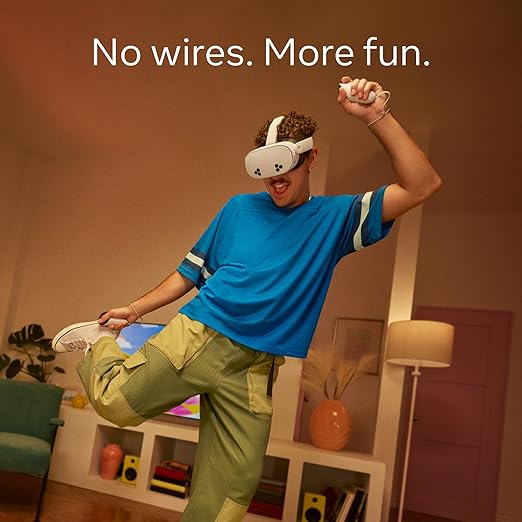
- Mixed Reality Magic: Blend digital content into your physical space with full-color passthrough—watch movies on a giant virtual screen or fight villains in your living room.
- Powerful Performance: Snapdragon XR2 Gen 2 delivers twice the graphical power of the Quest 2, ensuring smooth gameplay and fast app loading.
- Storage: 128GB holds dozens of games and apps (less than listed due to system files), with cloud support for easy reinstalls.
- Display: 1832 x 1920 pixels per eye, with 90Hz or 120Hz refresh rates for crisp, fluid visuals.
- Controllers: Ring-free Touch Plus controllers offer precise tracking and ergonomic grip.
- Audio: Built-in spatial audio speakers; supports Bluetooth or USB-C headphones.
- Battery: Up to 2.5 hours of use, with quick charging via USB-C.
- Bonuses: Includes Batman: Arkham Shadow (available now) and a 3-month Meta Quest+ trial.
What’s in the Box

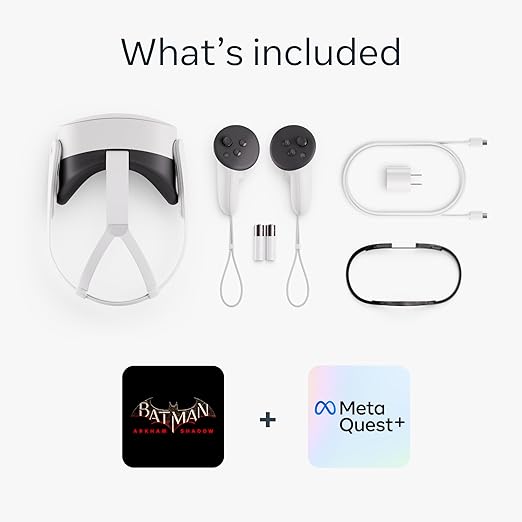
- Meta Quest 3S headset (128GB)
- Two Touch Plus controllers (with AA batteries)
- USB-C charging cable and power adapter
- Glasses spacer (for eyeglass wearers)
- Quick-start guide
Usage Tutorial: Getting Started with Your Meta Quest 3S
Step 1: Unboxing and Initial Setup
- Unpack Carefully: Open the box and lay out all components. Check for the headset, controllers, cable, adapter, and spacer.
- Charge the Headset: Plug the USB-C cable into the headset (port on the left side) and connect it to the power adapter. Charge for at least 30 minutes—full charge takes about 2 hours. A green LED on the side means it’s ready.
- Download the Meta Horizon App: On your smartphone (iOS or Android), download the Meta Horizon app from the App Store or Google Play. This is your control hub for setup and content.
Step 2: Pairing and Configuration
- Turn On the Headset: Press and hold the power button (right side, near the LED) for 2 seconds until the white light blinks. Put it on—you’ll see a pairing code.
- Connect via App: Open the Meta Horizon app, log in with your Meta account (or create one), and select “Connect New Device.” Choose “Quest 3S” and enter the pairing code shown in the headset.
- Wi-Fi Setup: Follow the app prompts to connect to your Wi-Fi network—stable internet is key for downloads and updates.
- Controller Pairing: The app will guide you to pair the Touch Plus controllers. Hold the controllers, press the Oculus button (right controller) and “B” button (left controller) until they vibrate and appear in the app.
Step 3: Fitting and Comfort
- Adjust the Strap: Loosen the Y-shaped strap by pulling the Velcro ends. Put the headset on, positioning the back strap low on your head, then tighten until snug but comfy.
- Set Interpupillary Distance (IPD): The Quest 3S has 3 preset IPD settings (58mm, 63mm, 68mm). Slide the lenses (gently push them together or apart) to match your eye spacing—test until the image is sharp.
- Glasses Spacer (if needed): If you wear glasses, snap the included spacer into the facial interface to prevent scratching.
- Check Fit: The headset should sit lightly on your cheeks, not pressing hard. For longer sessions, consider an aftermarket strap like the Meta Elite Strap (insert-amazon-link).
Step 4: Exploring the Interface
- Home Screen: After setup, you’ll land in the Meta Horizon OS home—a virtual space with a menu bar. Use the right controller’s Oculus button to bring up the main menu anytime.
- Navigation: Point the controller and pull the trigger to select options. Swipe with your thumb on the joystick to scroll.
- Passthrough View: Double-tap the headset’s side to toggle between VR and real-world passthrough—handy for grabbing a drink without removing it.
- Hand Tracking: Ditch the controllers for gestures—enable it in Settings > Hands and Controllers. Pinch to select, swipe to scroll.
Step 5: Installing Batman: Arkham Shadow and Meta Quest+
- Claim Your Game: From the Meta Horizon app or headset store (Library > Store), find Batman: Arkham Shadow. It’s pre-bundled—click “Download” (free with your purchase).
- Activate Meta Quest+: In the app, go to “Subscriptions,” redeem your 3-month trial, and explore a rotating library of VR titles—two new ones monthly!
- Storage Tip: Batman takes about 8-10GB. With 128GB total (around 110GB usable), uninstall unused apps via Library > Apps to free space.
Step 6: Using Your Quest 3S
- Gaming: Launch Batman: Arkham Shadow from your Library. Step into Gotham, swing through streets, and fight foes with the Touch Plus controllers—trigger to punch, grip to grab.
- Mixed Reality: Open apps like YouTube or Netflix via the store. Pin virtual screens around your room—resize by pinching corners with hand tracking.
- Social: Join friends in Meta Horizon Worlds (free in the store). Cast to your TV (Settings > Casting) to share the fun.
- Productivity: Try Workrooms (free app) for virtual desks and meetings—pair a Bluetooth keyboard like this one (insert-amazon-link) for typing.
Tips for Best Experience
- Battery Life: Expect 2-2.5 hours per charge. For longer play, use a USB-C power bank (insert-amazon-link) while wearing.
- Motion Sickness: Start with short sessions (15-20 mins). Sit if dizzy, and adjust IPD for clarity.
- Safety: Set a Guardian boundary (Settings > Guardian) to avoid bumping into walls—trace your play area with the controller.
- Cleaning: Wipe lenses with a microfiber cloth like this (insert-amazon-link)—no liquids!
Why Choose Meta Quest 3S?
The Meta Quest 3S 128GB isn’t just a headset—it’s a portal. At $299.99, it delivers premium VR and MR at a Quest 2 price point, with Batman: Arkham Shadow and Meta Quest+ sweetening the deal. It’s lighter and cheaper than the Quest 3, yet packs the same power—perfect for budget-savvy adventurers wanting standalone freedom.
Sure, its Fresnel lenses aren’t as sharp as the Quest 3’s pancake lenses, and the field of view (96° horizontal, 90° vertical) is slightly narrower, but for most, the trade-off is barely noticeable in action-packed games or casual use.
Ready to transform your reality?
The Meta Quest 3S is your all-in-one ticket to unreal experiences—grab yours and dive in!
Disclosure: This tutorial includes Amazon affiliate link placeholders. Purchases may earn a commission at no extra cost to you.
Note: This article includes affiliate links. Purchases made via these links may earn me a commission, with no additional cost to you.
 AI Sex Companion - Top Reviews & Deals 2025
Leave a comment